Thursday, September 26, 2013

Techie Tip: The Snipping Tool

Of course, my tips are usually for PC/Microsoft Users because that's what I have at home and school. I would love to buy a Mac, but I just can't bring myself to drop that kind of cash (yet). Anyways, I was wondering... do you ever use the Snipping Tool? It's Uh-MAZING! It allows you to select any image on your screen. It's most helpful when sharing shots with co-workers and students. Sometimes I use it to assist co-workers with technology questions via email. I'm a visual learner, so I find it helpful to send pictures in order to explain a step-by-step process.

I have a Smartboard and use it like crazy. It's a little absurd really. I rarely use my chart paper, which probably sounds terrible. Please don't judge. I'm getting better. Well, since there are so many amazing teacher authors out there, I have an abundance of PDFs and other images that I enjoy presenting to students. I also LOVE to write on them. Enter Snipping Tool. If you select the snipping tool it immediately allows you to select any portion of your screen. I especially like to use it on images that can't be copied in the traditional format {Control C}. It also helps me to stay technologically organized (because I'm not in the "real" world). I love everything I'm doing to be in one place or file. I often plan out a concept and save every part of the week-long plans in one document or Smart Notebook.

Here is an example: I always teach Magic or Sneaky E... I found a great poem (courtesy of Tales of Frogs & Cupcakes) to put into my Spelling lessons. So, I made sure the PDF was open and found the Snipping Tool in the Start menu. Then, I simply selected the area I wanted to snip. It always pops up in a new window. Just Copy and Paste into a new document like Word, PowerPoint, or SmartNotebook.
Open PDF and Snipping Tool
Select the portion you would like to cut. Copy.

Paste into a new document.

This has definitely become one of my favorite tools since discovering it a few years ago. I love technology and I love learning new tips and tricks. Do you have any techie tips to share?

Saturday, September 14, 2013

Polite Peter FREEBIE

Hi friends!
There was so much interest in Polite Peter that I'm posting the PDF for everyone right here on my page! He's super cute! We had discussions about when Polite Peter would use each phrase. Then students completed the Polite Peter page. I plan to add cards that present students with different scenarios, which require them to respond as Peter would (this is great practice for my English Learners as well).
Click HERE for the freebie!

Enjoy!

Friday, September 13, 2013

Five for Friday on Friday the 13th


1. Hooray for Friday!!! You have no idea how happy I was when I woke up this morning. I don't think this smile ever left my face today! I finally had a pretty uneventful week of instruction. I know that may sound strange, but I really needed it in order to get my students into a routine. We've had half-days, a sick day, assemblies, Back to School Night...Not the way to establish routines. 


2. After spending just a few weeks of school together, I began to notice how my students were speaking to each and the lack of manners. “Move (because I need to get to my mailbox)!” Shoving in line (because someone is in the wrong order). I was surprised at the behavior because my students are pretty sweet kids. So, I figured this is just one more thing I need to teach them. I know it makes a world of difference, so I will definitely take the time to teach and practice kindness, patience, and respect.

We have been focusing on what a good citizen looks like both at school and in the community. I finally got around to printing copies of Polite Peter this week! He's so adorable and my students have been referring to him all week. "Polite Peter would say 'Excuse me'." I love it because I don’t have to sound like a broken record (which students eventually tune out). Leave a comment or shoot me an email if you'd like a copy of the Polite Peter pages.

3. Have Fun Teaching

Have Fun Teaching has some fun skip-counting videos! We've been doing them for Brain Breaks and I my kids go crazy for them! We've tried the "Count By Twos" and "Count By Fives" videos. They've got some great beats and I can definitely tell which kiddos have got MOVES.
Click HERE to find HaveFunTeaching videos.

Instagram: SuperSparklyin2nd

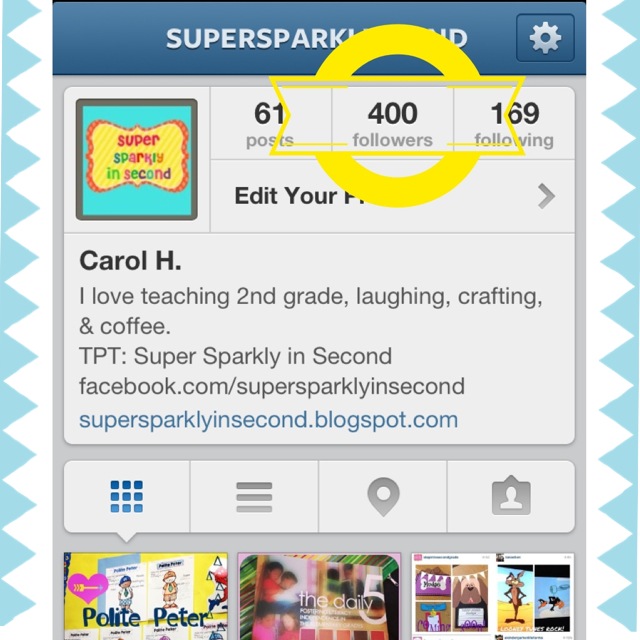
4.I have 400 IG friends! EEK! I never thought it'd become such an obsession. I follow teachers as well, if their accounts are public. I just love how easy it is to exchange ideas and see what other people are doing in their classrooms.Plus, you can find some great TpT packs and hear about sales and giveaways! Good stuff!

Check it out at TpT

5. I bought this pack from 24/7 Teacher and have been busy making copies! I was really interested in trying an Interactive Reading Notebook with my students this year, so I was thrilled when I saw what Amy had created. There are photos within the PDF so you know exactly what to do with the pages. I plan on putting them together for my students this weekend. I can't wait to share more about them as we use them.

I'm glad I was able to share a little of what I've been up to. I hope we all have restful weekends! I'm off for now. Ready to enjoy a date with my husband and the DVR!


Saturday, August 17, 2013

Free Brag Buttons

Earlier this week I promised I would share my brag buttons. Click HERE to see the post. The images are on the same page. These can be printed on white printer paper (save your cardstock). I was not pleased when I ran out of white cardstock this week. I was in the middle of a MAJOR printing job. BUMMER! 

Snag these Brag Buttons

Well, we started school on Thursday and I am already ridiculously busy! How'd that happen? Nonetheless, I'm so happy we only had 2 full days. It's much easier for the students AND teachers. 
Side note-slash-story: Our AC went out Thursday afternoon. Did I mention it's still 100 degrees over here?! Ick! I was glad I'd worn a dress. Unfortunately, it wasn't fixed on Friday either and I made the mistake of wearing pants! Pants! Dah! The kids seemed oblivious, but I felt like I was melting. It's supposed to be in good working order by Monday. Maybe I'll wear a skirt just to be on the safe side. 

Don't forget about the Back to School Sale at Teachers Pay Teachers! I'll be participating as a seller AND buyer. My wishlist is insanely long. I didn't think it would let you add so much, but my Wishlist is pages long. Don't forget to leave positive feedback on bigger purchases to earn TpT Credits. Then, you can use them towards other purchases. 


You can find these Number Posters in my store.

Happy shopping!


Monday, August 12, 2013

Monday Made It- Brag Buttons!

I'm linking up with 4th Grade Frolics' Monday Made It because I want to share my new buttons!

Do you love celebrating your birthday? I do! Mostly because it means I get presents. Who doesn't like presents?! My students are always so excited when their birthday comes along. I love to make a big deal of it by having the birthday kid stand on a chair while the class sings happy birthday (signing in ASL). My students LOVE it. Last year, I found out that my Teacher Resource Center had a button maker! I was able to make a 3 inch button for 50 cents. That's super cheap!  I made this button and placed it on the student after the song. The kids got birthday wishes all day long. 

I decided this year to spiff up my birthday button and create some new ones as well. I used PowerPoint to create some circles between 2 and 3 inches in diameter. Then, I found some cute balloon clip art (courtesy of Sonya DeHart Design) for free on TpT. I failed to leave enough of a border so as you can see part of the designs are wrapped around the back. Not too big of a deal. That green also isn't as bright as I'd like it to be so I'll probably be trying that again. As soon as I make a few modifications I'll post this as a freebie. Hopefully, this happens before the end of the week. Tomorrow is my first contracted day so I'll be pretty busy this week.
2 in. buttons
In case you missed it... The Fabulous Life of an Elementary Teacher just launched her blog! She's a smart girl too because she launched it with a major giveaway! Check it out! You can even win something from my TpT store!
Click HERE to head to the Blog Launch Giveaway.

Well friends, I'm off to bed because it's time to start all that early rising nonsense.

Tuesday, August 6, 2013

Cutest classroom sharpener

Have you heard of the Quietest Classroom Pencil Sharpener? I pinned it on my Back To School Wishlist board on Pinterest a while back. It just looked super cool and so vintage! 

So, I finally got one and am ready to tell you all about it now that I tried it out. Now, I was ridiculously excited when it arrived in the mail in a small box. By the way, I love love love online shopping. It's so fun to be surprised by purchases that arrive suddenly in the mail. *Note: this only works when you don't check the tracking number daily
Firehouse Red
I giddily opened the package, grabbed a pencil, and... had no idea how to use the sharpener!! I was like "What? This is not working." So, I remember skimming a review and reading that there was a Youtube video with directions for using this thing. I immediately grabbed the laptop and searched for the video. I found a good one and was like "Okay! I can do that!"
Click HERE to watch the video.

First of all, I didn't even put the pencil in right! OOPS! Second, I was turning the handle in the wrong direction. Jeez, get it together!

I tried the pencil sharpener without mounting it because I'm super impatient. I pulled the tab and inserted the pencil. Turned that lever in the CORRECT direction and VOILA! A super sharp pencil! Like scary sharp! I can't wait to mount this baby in my classroom! 

Oh, and I will probably be the only person sharpening pencils or maybe I'll show a few students how to use it. Typically, I'm the only person who sharpens pencils in my class. I occasionally have students from previous years who offer to sharpen them during recess (of course I love older helpers). What are your pencil sharpening practices?
My old sharpener was an X-Acto School Pro Electric Sharpener. It lasted almost the entire school year. It was such a bummer that the blade dulled so quickly.I had to break out the school-issued pencil sharpener. It's sooooo loud. It's definitely not my fave, but it's gotten the job done.  I have recently found that the blades can be replaced on the X-acto sharpener for about $25. 
I'll see how the Quietest Classroom Sharpener works out and keep you posted on its endurance. Now I've got to go find a place to mount it in my classroom so I can hurry up and sharpen all those new pencils!! If you want one, you can head to Classroom Friendly Supplies {SHOP].


Totally in love!

Friday, August 2, 2013

Just in the nick of time...Five for Friday

Okay... Who flipped my calendar to August?!! I was hanging out, watching TV, making things on the computer and BAM! August. <insert crybaby face here>
Okay, I'll stop being over dramatic now. This means school starts in less than 2 weeks for me. It's definitely go time and I can't even write out my to do lists fast enough. I did make it to Doodle Bugs Teaching Five for Friday Linky party though. Yeay!


My week did start off pretty great because my pens went on sale at Office Depot. Yipee!! I love these pens, but love them even more whenever I can get a deal on them. They were 7 bucks for 12 pens! They do bleed, so they aren't for my calendar, but they are perfect for writing notes and grading papers. My favorite color of the bunch is PURPLE!
I broke out the mod podge again.... dun dun dun! It wasn't so bad this time. I wanted to take my mailboxes back to my room, but I hadn't fixed the labels like I planned. I'm not sure if I mentioned that we can't leave any "furniture" of our own in the classroom over summer at my school. My Crafty Teacher Room looks a mess during the summer! I just bring so much stuff back home over the summer. 
The good news was that I was pretty much forced to re-do my mailboxes. I knew I wanted to re-number them and really wanted to use my washi tape. I tried the washi tape over the labels, but my tape was much too transparent. So, with the advice of my instagram friends *wink* (thanks friends!) I put address labels over my mailbox labels [Photo 1]. 
Then, I placed a strip of washi tape over them [Photo 2]. They look beautimous! I numbered the labels with a black sharpie as well. Of course, I doubt that this would hold up once my second graders got their grubby little hands in there. So, I decided to cover the labels with clear packing tape. Seems pretty sturdy. I'll show you more photos once the entire thing is done. 
I did make it to my classroom for a few hours this week. I don't go very often because my commute is 45 minutes. I went with the intention of rearranging some of my furniture and setting up my desk. Unfortunately, I'm sure I spent 20% of my time unpacking and 80% talking to ....EVERYBODY. I can be such a Chatty Cathy! And hello! I like EVERYONE. Also, apparently, not everyone has a Facebook account at my school. Whaaaaaaat?? Yeah. Crazy. So... my class is still looking pretty sad. 

My niece and I had a lunch date with my hubby! We've been planning on going to lunch all summer. I think next week is going to be filled with all the things I said I was going to do all summer. This should be interesting because I'll also be getting all my back to school projects done as well. What a juggling act that is going to be. 

We stopped in at a local library, which is currently displaying some of Doug Hansen's illustrations and sketches. He published Mother Goose in California and Aesop in California. The first book is a beautiful ABC book (which we own). Of course my favorite little missy was more interested in checking out books. She was thrilled to find her favorite The Very Hungry Caterpillar! I managed to talk her into checking out some of his other books as well.

Remember how I mentioned I was reformatting my Common Core stuff! Probably not, and that's okay. I finished!!! O-M-G!! Feels like it took years! I'm pretty sure it was only days. Anyways, I finished it all and bundled it. That means all of the Common Core planning materials...all 42 pages...in a portrait format are being sold together! It'll be marked down to $3.00 for the first 48 hours! Check it out by clicking HERE.

Okay friends, it's been one fun-filled week. Enjoy your weekend!